
Minimalist Wallpaper iPhone Aesthetic

Your iPhone is something you look at dozens of times every day, so its appearance can have a surprisingly big effect on how your digital space feels. A cluttered wallpaper filled with bright colors, complicated graphics, or too many details can make your screen feel overwhelming. In contrast, a simple and carefully chosen background can make your phone look calmer, cleaner, and more sophisticated. A minimalist wallpaper iPhone aesthetic focuses on simplicity, balanced colors, subtle details, and plenty of visual breathing room. The goal is not to make your screen boring but to create a polished background that complements your icons, widgets, and overall personal style.
Choose a Soft Neutral Color Palette

Neutral colors are one of the easiest ways to create a minimalist phone screen. Shades such as warm white, beige, cream, taupe, soft gray, muted brown, and light sand can give your wallpaper an elegant appearance without competing with your apps. These colors also work particularly well with both light and dark icons, making them versatile throughout the day.
A neutral background can create the impression of a more organized screen because there are fewer strong visual elements demanding attention. If pure white feels too plain, choose an off-white or warm ivory shade. Similarly, instead of a dark black background, charcoal, espresso, or deep gray can provide a softer appearance. The best choice depends on your personal preference and the colors already used in your phone’s widgets and icons.
Try Minimalist Beige Wallpapers

Beige has become a popular choice for digital aesthetics because it feels warm, sophisticated, and understated. A beige wallpaper can include subtle gradients, paper textures, soft shadows, or barely visible abstract shapes while maintaining a clean appearance.
For an especially refined look, combine several similar beige tones instead of using a single flat color. A slightly darker section near the bottom can create visual depth, while a lighter upper area can keep the lock screen bright. Avoid adding too many decorative elements. One small organic shape, line, or texture can be enough to make the background feel intentionally designed.
Use Simple Black and White Designs

Black-and-white wallpapers are timeless and work well for people who prefer a more modern or sophisticated appearance. A completely black background can create a dramatic look, especially on iPhones with OLED displays, while a white or light-gray background offers a brighter and cleaner alternative.
You can also experiment with minimalist black-and-white photography, thin geometric lines, small typography, or simple architectural shapes. The important thing is to maintain a clear visual hierarchy. If the wallpaper contains a subject, keep it relatively small or position it away from the area where your clock and notifications appear. This ensures the lock screen remains functional rather than becoming difficult to read.
Add Subtle Nature-Inspired Details

Minimalism does not mean removing personality from your wallpaper. Nature-inspired details can introduce warmth without making the design visually complicated. A single leaf, delicate branch, small flower, cloud, moon, stone, or distant landscape can provide enough character for a beautiful background.
Muted greens, earthy browns, dusty blues, and soft cream tones are especially effective for this style. Instead of using a highly detailed photograph, look for images with generous negative space. A simple photograph of a single leaf against a neutral wall can often look more elegant than a busy landscape filled with multiple objects.
Experiment With Soft Gradients

Gradients are another excellent option for a clean iPhone background. A subtle transition between two or three complementary colors can create depth while keeping the screen visually simple. Popular combinations include cream and beige, pale pink and ivory, light blue and gray, sage and cream, or lavender and soft white.
The key is to avoid harsh color transitions. Minimalist gradients generally look best when the colors blend gradually. A very subtle gradient can also help your icons stand out without creating the strong contrast associated with brighter wallpapers.
Keep Plenty of Negative Space

Negative space is one of the most important principles when creating a minimalist phone background. It refers to the empty areas surrounding the main visual elements. On an iPhone, this space is especially useful because your apps, widgets, clock, and notifications already create plenty of visual information.
A wallpaper with substantial empty space allows these elements to remain easy to see. If you choose an image featuring a small object, consider placing that object toward one side or near the lower portion of the screen. This can create a balanced composition while leaving the central area relatively uncluttered.
Choose Abstract Shapes

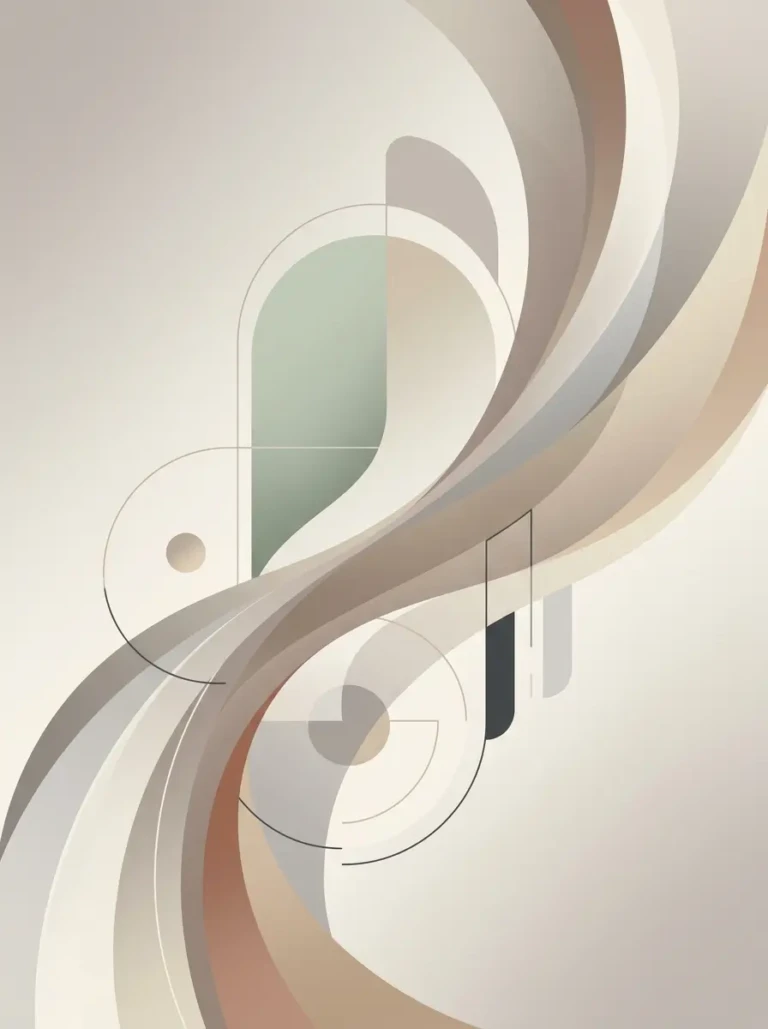
Simple geometric shapes can create an artistic appearance without overwhelming your display. Circles, arches, rectangles, curves, waves, and thin lines can all be used to create modern wallpaper designs.
For a sophisticated result, keep the number of shapes limited and use a restrained color palette. For example, a cream background with one large taupe arch and a thin brown line can look more intentional than a design containing many different shapes. Abstract designs also have the advantage of being less distracting than detailed photographs, making them ideal for people who frequently use their phones for work or productivity.
Consider Monochromatic Wallpapers

A monochromatic wallpaper uses different shades of the same color. This approach is particularly effective when you want a cohesive and polished screen. You could choose several shades of sage green, dusty blue, chocolate brown, soft pink, lavender, or gray.
Monochromatic designs create visual consistency without requiring complex graphics. You can introduce subtle variations through gradients, textures, shadows, or shapes. Because the colors remain within the same family, the result usually feels calm and organized even when the wallpaper contains several design elements.
Match Your Wallpaper With Your Widgets

A beautiful wallpaper can lose its impact if the widgets and icons clash with it. When choosing a background, think about how the complete home screen will look rather than evaluating the wallpaper alone.
If your widgets use white and beige tones, a warm neutral wallpaper can create a cohesive appearance. If your widgets are dark, a lighter background may provide better contrast. You can also use your wallpaper to establish a color theme for the entire screen. For example, a muted green background can be paired with cream widgets, while a soft brown background can work beautifully with ivory and black elements.
Create a Clean Lock Screen

The lock screen deserves special attention because it is often the first thing you see when picking up your phone. A minimalist design can make the lock screen feel more intentional and luxurious.
Choose a background with enough empty space around the clock. Avoid placing important visual elements directly behind the time or notification area. If you use widgets, select only the ones you genuinely need. Weather, calendar information, battery levels, or reminders can be useful, but adding too many widgets can quickly undermine the minimalist appearance.
Explore Soft Pastel Colors

Pastel colors are ideal if you want something softer and more playful than traditional neutrals. Pale pink, baby blue, muted lavender, soft peach, sage green, and buttery yellow can all create attractive backgrounds while maintaining a calm appearance.
To keep pastel wallpapers minimalist, avoid combining too many colors. Two complementary shades are often enough. A pale lavender gradient, for example, can create a sophisticated background without requiring any additional graphics. Similarly, a soft pink background with a tiny white abstract shape can feel feminine without becoming overly decorative.
Use Typography Sparingly

Words and short phrases can personalize an iPhone wallpaper, but typography should be used carefully. A single word such as “breathe,” “focus,” “create,” or “slow” can add meaning without overwhelming the screen.
Choose a simple typeface and keep the text relatively small. Avoid placing large text directly behind the clock or app icons. If you prefer a more editorial look, a thin serif font can provide an elegant appearance, while a clean sans-serif typeface creates a more contemporary style.
Try Minimal Photography

Photography can still work beautifully within a minimalist aesthetic as long as the composition remains simple. Look for photographs featuring one main subject, muted colors, and plenty of open space.
Examples include a quiet beach with a large amount of sky, a single architectural detail, a cup on a plain table, a close-up of linen fabric, a distant tree, or a simple shadow cast across a wall. These images provide visual interest while remaining calm enough for everyday phone use.
Create a Cozy Digital Aesthetic

Minimalism does not have to feel cold or overly modern. You can create a cozy digital aesthetic by combining warm neutrals, soft textures, natural materials, and subtle organic shapes. Think linen, paper, wood, ceramics, dried flowers, warm sunlight, and soft shadows.
A wallpaper inspired by these elements can make your phone feel more personal and inviting. Warm cream backgrounds, muted caramel tones, and subtle grain textures are particularly effective when you want your screen to feel relaxed rather than strictly minimalist.
Use Dark Wallpapers for a Sophisticated Look

Dark wallpapers can create a completely different mood. Deep charcoal, dark brown, navy, forest green, and muted black can make the iPhone interface appear sleek and dramatic.
Dark backgrounds are also useful when you want your icons and widgets to stand out. Instead of choosing pure black, consider a slightly textured or gradient background. A charcoal-to-black gradient, for example, adds subtle depth while preserving the clean appearance associated with minimalism.
Coordinate Your Home Screen Icons

Your wallpaper is only one part of the overall design. App icons can have a significant effect on whether your home screen feels minimalist. If you use customized icons, choose a consistent color palette and visual style.
Neutral icons can work particularly well with beige, cream, gray, and brown wallpapers. For colorful backgrounds, consider simplifying the icon colors so the screen does not become visually crowded. You can also organize apps into folders and leave sections of the home screen intentionally empty.
Choose Wallpapers Based on Your Personality

The best wallpaper is ultimately one that reflects your personal taste. Someone who enjoys calm interiors may prefer beige, cream, and warm wood-inspired designs, while someone interested in contemporary art might prefer abstract geometric compositions.
Think about the colors, textures, places, and objects you naturally gravitate toward. Your phone can become an extension of those preferences. Rather than following every popular aesthetic trend, choose a design that you will still enjoy looking at several weeks or months from now.
Keep Seasonal Changes Subtle

Changing your wallpaper with the seasons can keep your phone feeling fresh without abandoning your minimalist style. During spring, soft greens and pale florals can introduce a natural touch. Summer may call for sandy neutrals or muted blue tones, while autumn works beautifully with caramel, beige, rust, and warm brown.
For winter, consider cream, gray, icy blue, or deep charcoal. Seasonal changes do not need to involve obvious holiday graphics. Simply shifting the color palette can create a new atmosphere while maintaining a consistent visual identity.
Final Thoughts

A minimalist wallpaper iPhone aesthetic is less about following one specific design trend and more about creating a screen that feels calm, balanced, and intentional. Neutral colors, subtle gradients, negative space, simple photography, abstract shapes, and restrained typography can all contribute to a sophisticated appearance.
The most successful minimalist wallpapers make room for the elements that are already part of your iPhone interface. Your clock, widgets, notifications, and applications should remain easy to see rather than competing with the background. By choosing a simple composition and a carefully considered color palette, you can transform your everyday screen into something that feels polished and personal.
Whether you prefer warm beige tones, monochromatic designs, soft pastels, dark backgrounds, nature-inspired imagery, or contemporary abstract art, there are countless ways to create a minimalist look. Start with the colors you love, remove unnecessary details, and leave enough negative space for your interface to breathe. A simple wallpaper can make your phone feel cleaner, more organized, and much more reflective of your personal style.